

Verified Plan Summary — Antigravity 20x Private Limit
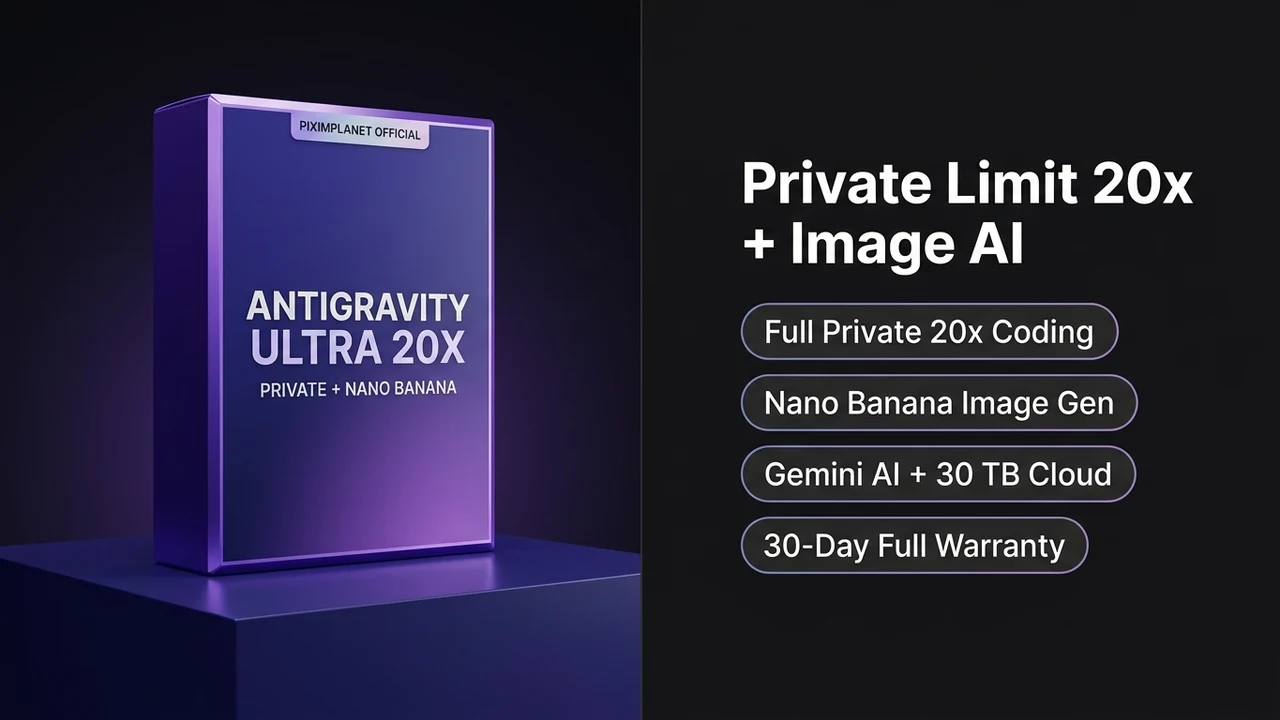
- Private Full-Limit 20x Coding: Only one developer uses Antigravity 20x on this workspace, backed by over 770 completed upstream fulfillments.
- Nano Banana Image Studio Active: Generate UI illustrations, product banners, icons, and web graphics with Nano Banana image generation.
- Gemini AI & 30 TB Storage: Includes Gemini AI tools for text, code, and file work plus 30 TB storage across Drive, Mail, and Photos.
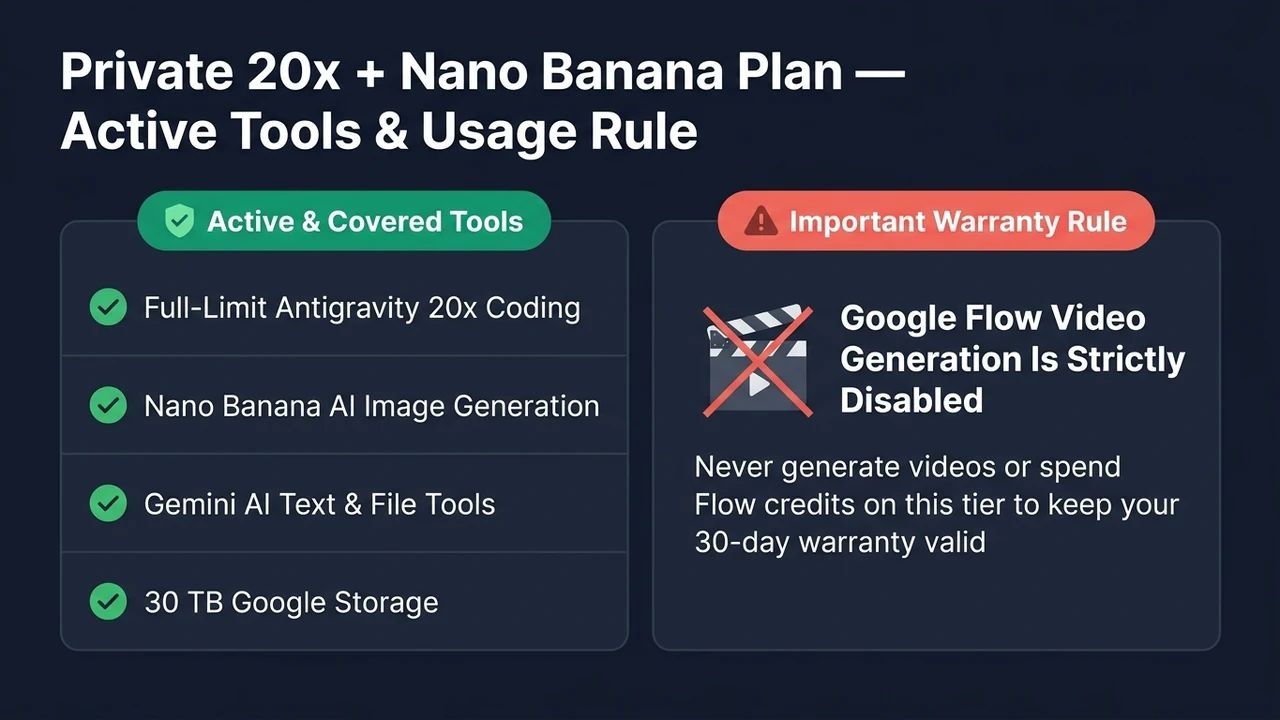
- Important No-Video Rule: Google Flow video generation is strictly off-limits on this tier to preserve role separation and keep your 30-day warranty valid.
1. Antigravity 20x Private Limit Overview and Exact Plan Scope
Web developers, frontend builders, and UI engineers frequently need two things side by side: an unshared coding limit for building applications and a fast AI image generator for hero graphics, icons, placeholders, and store visuals—without needing cinema video rendering. The Antigravity 20x Private Limit plan matches that exact workflow by combining full-limit solo 20x coding with Nano Banana image generation, Gemini AI tools, and 30 TB storage.
Transparency comes first on PiximPlanet, so here is the exact rule straight from our upstream specification: this workspace achieves unshared coding isolation by separating coding from video rendering. You receive 100% of the Antigravity 20x coding limit plus Nano Banana image tools, while Google Flow video generation is strictly disabled.
Do not open Google Flow to render videos or spend Flow credits on this package, as doing so triggers automatic upstream cancellation without refund. If your project requires AI video rendering in Veo 3.1 alongside coding, pick our Google AI Ultra 20x 25K Flow Suite with Veo 3.1 video instead.
Before you spend money on any digital subscription, you deserve a clear, plain-English list of what works, what limits apply, and how support handles issues if anything goes wrong mid-month. Every detail below is written directly from our live verified plan rules so there is zero guesswork at checkout.
2. Exact Included Tools, Quotas, and Plan Rules
For everything inside software development and static visual design, this tier gives you full daily capacity. You can build Next.js storefronts, Flutter apps, or WordPress plugins using your unshared Antigravity 20x quota while creating matching web graphics in Nano Banana image generation.
Alongside image creation, Gemini AI tools handle document summarization, JSON schema drafting, spreadsheet cleanup, and code explanation across long files. Having 30 TB storage included also lets designers and developers store high-resolution PSD, Figma, and raw image libraries in the cloud.
As long as you stick to Antigravity 20x coding, Nano Banana images, Gemini AI, and 30 TB storage—and leave Google Flow video untouched—your order is covered for the entire month under our 30-day warranty.
Mandatory Warranty Rule on Private Limit + Image Plan: Full-limit Antigravity 20x coding, Nano Banana image generation, Gemini AI tools, and 30 TB storage are 100% active and covered. Never generate videos in Google Flow or spend Flow credits on this tier—violating this rule cancels access immediately without refund.
Core Capabilities Inside Nano Banana image generation and Gemini AI tools
Google publishes its consumer and workspace AI tier structure on the official Google One AI plans overview, while model families and multimodal updates are documented on Google DeepMind Gemini documentation. Our store packages give individual developers and studios affordable regional access to verified single-coder allocations without paying full list billing.
Every workspace works natively on Windows 10, Windows 11, and macOS (both Intel and Apple Silicon machines) over standard home fiber, office Wi-Fi, or mobile hotspots across India and internationally. You never have to install third-party proxy extensions or route your code traffic through slow overseas VPN servers.
3. Why an Unshared Antigravity 20x Private Limit Allocation Protects Your Workday
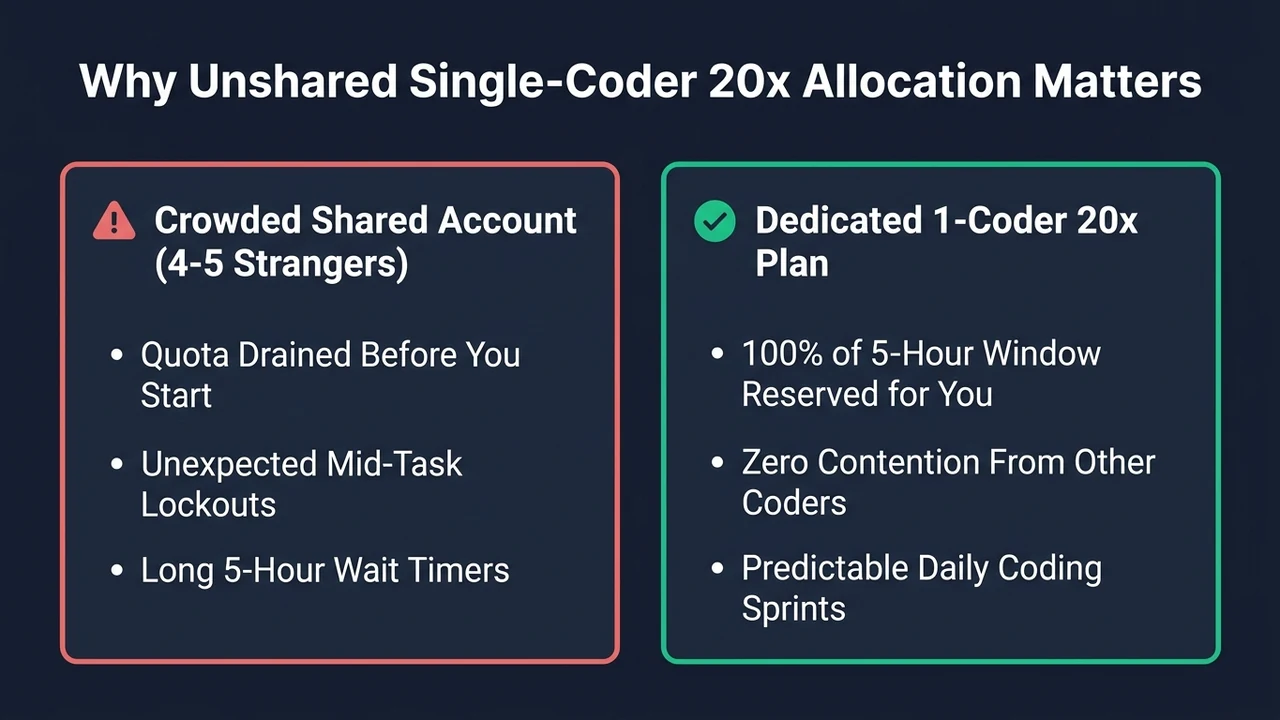
The biggest complaint developers have when buying discounted AI plans on random forums is hidden account crowding. When a seller quietly puts four or five programmers onto the same coding bar, one person running automated background scripts at 10:00 AM drains the entire quota before anyone else even opens their editor.
If you have ever hit the dreaded rate-limit wall mid-task, you already know how frustrating that interruption feels. We wrote a practical breakdown of why shared pools fail in our guide to fixing Google Antigravity rate-limit exceeded errors, and every plan in our approved catalog is built specifically to avoid shared coder collisions.
On this Antigravity 20x Private Limit package, we verify upstream before listing that only one software developer uses the Antigravity coding allocation. Nobody else runs multi-file edits against your coding ceiling, which means your morning, afternoon, and late-night sessions stay predictable throughout the billing term.
4. Real Daily Software Engineering and Project Workflows
In day-to-day software work, higher model limits change how you approach messy tasks. On restricted free tiers, developers hesitate to include full context files because three or four follow-up prompts can lock the editor for hours. With a dedicated 20x coding ceiling, you can pass complete controller files, database migrations, test logs, and API schemas in one go.
Backend engineers use that headroom to refactor Express, FastAPI, Laravel, Spring Boot, or Go microservices while checking edge cases across dozens of endpoints. Instead of copying small snippets into a browser tab one function at a time, you keep the entire module structure visible inside your project workspace.
Frontend and mobile developers see the same practical benefit when updating React, Next.js, Vue, Tailwind, Swift, or Kotlin screens. You can trace state bugs across parent and child components, convert static design specs into responsive layouts, and clean up TypeScript compiler warnings in a single sitting.
Having 30 TB storage and 30-day warranty alongside your coding setup also keeps supporting tasks simple. You can review long PDF requirements, store project backups, check error logs, and prepare release notes without juggling separate paid tools.
Multi-File Refactoring
Update routes, shared types, database queries, and unit tests together across real production repositories without cutting context short.
Bug Triage & Logs
Paste full stack traces, CI build output, and failing test logs to isolate root causes and verify clean fixes before pushing code.
Who Fits Best
Ideal for frontend developers, web designers, SaaS builders, and app creators who want unshared Antigravity 20x coding plus Nano Banana AI image generation and 30 TB storage, and who never render videos in Google Flow.
5. Understanding Google’s ~5-Hour Rolling Quota Window
One detail every honest store should explain upfront is how Google manages usage on Ultra 20x plans. Even on top-tier plans, usage is not an infinite unmetered firehose for 24-hour automated bot scraping; instead, Google uses a rolling refresh cycle that typically replenishes around every five hours.
For a single human developer working normal coding blocks, the 20x ceiling inside each five-hour window is generous enough to handle sustained multi-file coding, debugging, terminal checks, and code reviews comfortably. When you take a lunch break or wrap up an afternoon sprint, the rolling window refreshes automatically according to Google’s live schedule.
What ruins that five-hour rhythm elsewhere is sharing one seat across multiple developers—which is why keeping a strict single-workstation, single-coder rule matters so much. To protect your workspace stability and warranty eligibility, always use your plan on your own personal workstation rather than running simultaneous sessions across multiple people or machines.
6. How to Pick the Right Plan in PiximPlanet’s Catalog
Every developer and creative team works differently, so we organize our seven approved packages strictly by what tools and durations you actually need rather than pushing everyone onto the most expensive tier. Checking three quick questions makes choosing simple.
First, ask whether you render AI video in Google Flow. If you write code all day and never touch AI video editors, pure-coding plans with `0 Flow credits` give you full coding capacity without charging for video render pools. If you want light video clips, pick our 5,000-credit Essential tier; if you produce heavy Veo 3.1 video campaigns, choose the 25,000-credit Flagship Suite.
Second, check whether you prefer a 30-day pass or a 90-day quarterly commitment. For short client sprints or testing a workflow for one month, any 30-day package works well. If you are building across an entire quarter, our 3-month options lower your monthly cost by 15% to 25% and keep one continuous setup running for all 90 days.
Third, check if you specifically want Nano Banana image tools or fast express turnaround. Web builders who create static graphics without video often pick our Private Limit + Image tier, while developers on urgent deployment deadlines favor our express-dispatch Coding Agents tier.
7. Checkout, Order Vault Delivery, and Full-Term Warranty
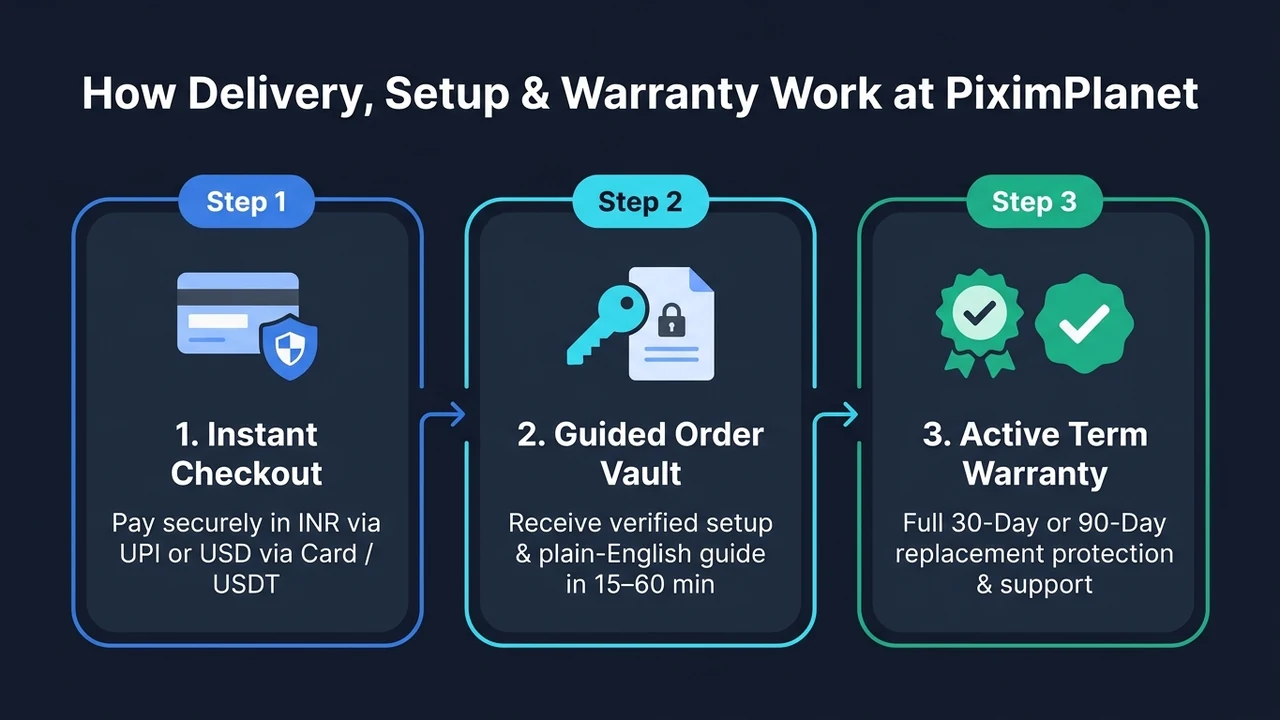
Ordering your Antigravity 20x Private Limit package on PiximPlanet takes less than two minutes. Buyers in India can pay directly in INR via instant UPI apps (Google Pay, PhonePe, Paytm, BHIM), debit or credit cards, NetBanking, or PiximPlanet Store Wallet, while international customers can check out smoothly in USD.
As soon as payment clears, your order enters our live 24-Hour Delivery SLA queue inside your account dashboard. Most orders are verified, prepared, and delivered to your encrypted Order Vault within 15 to 60 minutes during active operating hours, complete with a clear step-by-step setup guide written in plain English.
Every approved listing on this page is backed by our conditional full-term replacement warranty—covering 30 full days on 1-month plans and 90 full days on 3-month plans—governed transparently by our official Warranty and Refund Policy. If we ever fail to deliver within 24 hours, you are entitled to a 100% refund.
If a verified technical interruption happens mid-term while you are following the standard plan rules (single user, no credential sharing, no unauthorized account security tampering, and respecting Flow credit rules), simply open a 1-click support ticket from My Subscriptions. Our team troubleshoots or replaces your workspace promptly—and if replacement stock is ever unavailable, we credit the remaining unused days 1:1 into your INR Store Wallet.
Simple Rules That Keep Your 30-day warranty Active
Keeping your warranty valid for the entire term only requires ordinary fair use: use the workspace as one individual developer, avoid sharing access with teammates or third-party scripts, follow the plain-English setup steps inside your Order Vault, and respect any Flow video rule stated in your plan summary above.
Have a question before paying? Tap the live seller ping button or message our support desk anytime to confirm current queue speed before completing your Antigravity 20x Private Limit order.
When estimating monthly tool budgets, solo engineers and small agencies also look at predictable billing. Paying in local currency without surprise foreign card markups—and knowing your Antigravity 20x Private Limit workspace carries active replacement protection—lets you focus on shipping client deliverables instead of worrying about billing surprises.
Teams migrating from standard chat tabs into full repository workspaces usually notice the biggest time savings during test writing and documentation cleanup. Having Gemini AI tools available alongside your main code editor makes turning rough commit history into clean changelog notes and API guides straightforward.
Local project privacy and clean organization matter too. Keeping separate git branches for experimental refactors lets you review every proposed file diff line by line in your IDE before merging changes into your main production branch.
Whether your stack centers on Python data pipelines, Node.js and TypeScript web services, Laravel and WordPress backends, or mobile apps in Flutter and React Native, having sustained context depth removes the constant stop-and-wait friction of entry-level plans.
Inside your PiximPlanet account dashboard, every active subscription displays a live countdown bar showing your exact remaining warranty days, quick setup instructions, and a direct support button so help is always one click away without hunting through old emails.
Before dispatch, our fulfillment desk checks each allocation against the exact tier checklist on this page so your Order Vault setup arrives ready for real project work right away.
If your workload grows next month—for example, moving from a 30-day sprint pass to a 90-day quarterly plan or adding Veo 3.1 video credits for a product launch—you can switch tiers anytime at renewal inside your PiximPlanet account.
For security-conscious developers, keeping sensitive API keys, production database credentials, and private signing certificates stored locally inside ignored environment files while sending clean application logic to the coding assistant is good daily hygiene across every project.
When debugging tricky front-end hydration issues, CSS layout shifts, or slow SQL joins, pasting both the failing file and the exact console or query-plan output in one prompt usually solves the problem in two turns instead of ten.
Students, indie founders, and remote contractors working across Indian Standard Time, European hours, or North American client schedules also benefit from zero regional locks—your workspace runs at the same speed from home, a co-working desk, or while traveling.
Every purchase receipt and warranty record stays permanently logged inside your PiximPlanet account history, making monthly software expense tracking clean and simple for freelancers, consultants, and registered agencies.
Before running large multi-file refactors across dozens of directories, committing a quick clean git checkpoint takes five seconds and makes comparing before-and-after test runs effortless.
Need help picking between two plans for your specific tech stack or video workload? Message our support desk before checkout and we will point you to the exact tier that fits your monthly budget.
8. Frequently Asked Questions
Can I use Nano Banana image generation freely on this plan?
Yes. Nano Banana AI image generation, full-limit Antigravity 20x coding, Gemini AI text and file tools, and 30 TB Google storage are all active and included.
Can I generate videos in Google Flow on this specific tier?
No—never generate videos through Google Flow or spend Flow credits on this plan. Flow video is strictly prohibited here and using it voids your plan and warranty immediately. Choose #5371 (5K Flow) or #5380 (25K Flow) if you need video.
Is my Antigravity 20x coding limit shared with any other coder?
No. You are the only developer using Antigravity 20x on this workspace, so you receive the full private coding limit.
Is a full 30-day warranty included when I follow the no-Flow rule?
Yes. Orders that follow the standard single-user and no-Flow-video rules are protected for all 30 days by our conditional replacement warranty.
Does it work on Windows and macOS without a VPN?
Yes, all included coding, Gemini AI, Nano Banana image, and cloud storage tools work on Windows and macOS without a VPN.


No verified buyer reviews yet.